Start from What You Have
A new tool should not mean retyping years of hazard analysis. Start from a sector template or a blank project, then bring your register in through its Excel workbook, or have our engineers do it for you.
From a Template to Your Case
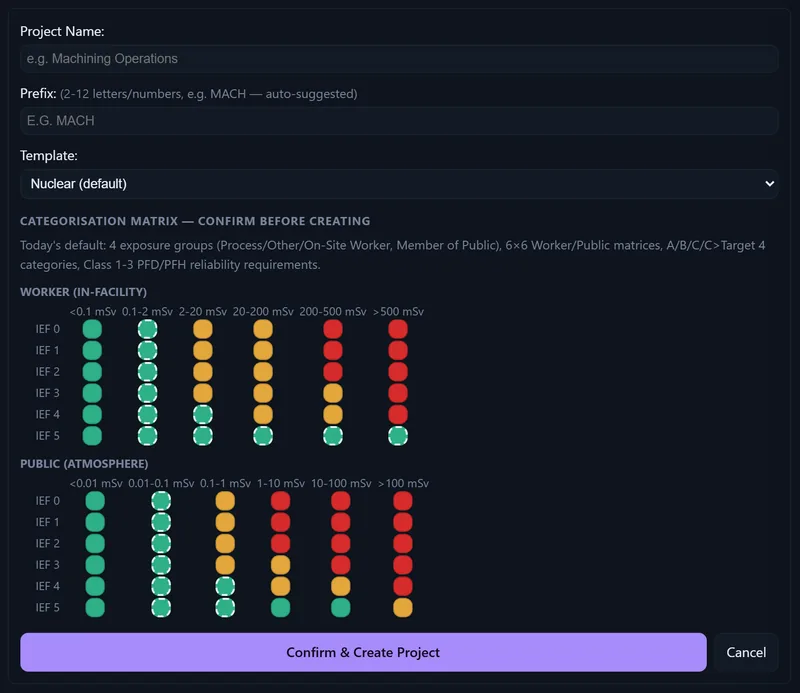
Four steps, and nothing is created until you confirm:
- Choose a templateStart from a sector template, or start blank.
- You confirmThe project is created when you confirm, not before. The creation is recorded in the project’s audit chain, with who confirmed it.
- Your register, in the workbookYour hazard register, barrier schedule or legacy tool export goes into the project’s Excel workbook, in the template’s shape. Our engineers can do this for you.
- Your case in SAFOPSYour faults, causes and measures, each fault with its bow-tie.
Nothing Is Created Until You Confirm
Choose a sector template, or start blank. The project is created only when you confirm; then your register goes into its Excel workbook.
Do It Yourself, or Have Us Do It
Your existing hazard log comes across from wherever it lives: a Cassandra export, an Excel register, a hazard log inside a Word report. Two ways. Bring it in yourself: load the file or paste the text into the assistant, which drafts the entries for a person to review and sign off (with an AI provider configured), or fill the Excel workbook in the template’s shape and upload it. Or send it to us, and our engineers do the migration for you. See the procurement FAQ.
No Invented Claims
A migration never creates a reliability claim that nobody made, and nothing imported earns credit without underpinning evidence.
Recorded States: Two Routes
Bringing data across is about the case. What happens on the plant afterwards (a measure failing, a component going out for maintenance) reaches SAFOPS as a recorded state in one of two ways: entered by a person, or from your asset management system.
- Entered by a person. A signed-in person with the right to do so records what happened (a measure failed, a component out for maintenance), with the time and a reason, and the Live position is calculated from it.
- From your asset management system. Exports from your asset management system (work orders, outages, observed failures) come in as proposals; a person confirms each one, and the Live position is calculated from what is confirmed. SAFOPS never records a state by itself. The intake is switched on for your deployment when you need it.
Either way, the result is shown as the Live position, always with its stamp, “Live position · recorded time”, beside the Baseline case, which does not change. See the Baseline case and the recorded position.